 Uzair
Uzair 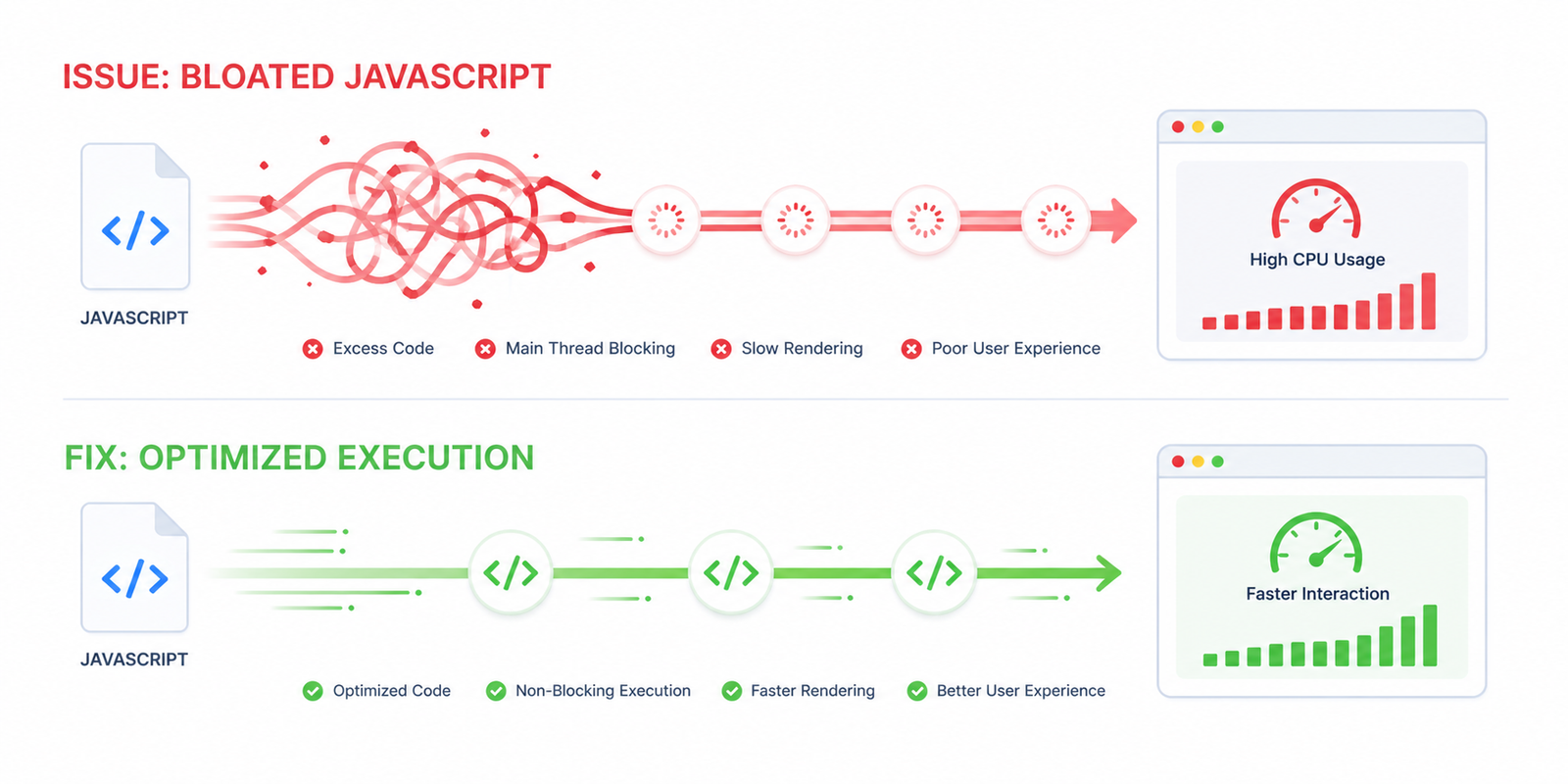
Reduce JavaScript Execution Time: High JS execution time on WordPress comes from too many plugins, heavy page builders, and third-party scripts. Cut it by removing unused plugins, delaying non-critical JavaScript, deferring the rest, and lazy-loading third-party tags — lowering Total Blocking Time and improving INP. or use Easy Optimizer which does this automatically.
“Reduce JavaScript execution time” is one of the most stubborn warnings in PageSpeed Insights. You can compress images, fix render-blocking CSS, and upgrade hosting — and JS execution time barely moves. That’s because it’s not about how much JavaScript you ship. It’s about what gets executed and when.
This guide explains where JavaScript execution time comes from, how to measure it on WordPress, and the techniques that consistently cut it on real sites.
What Is JavaScript Execution Time?
JavaScript execution time is the CPU time the browser spends actually running JavaScript — not downloading, not parsing, but executing the code line by line.
PageSpeed Insights flags this when execution exceeds 2 seconds on a simulated mid-range mobile device.
It’s important because:
- While JS is executing, the main thread is blocked
- While the main thread is blocked, the page can’t render or respond to input
- That damages LCP, TTFB, and INP simultaneously
Three Core Web Vitals metrics, all hurt by the same root cause.
Why WordPress Has High JS Execution Time
The default WordPress install is fast. The problem is the ecosystem layered on top:
- jQuery + jQuery Migrate — still loaded by default, ~30 KB of execution time on most sites
- Page builder runtime — Elementor, Divi, WPBakery each ship JavaScript that initializes every interactive element on the page
- Plugin scripts — every Contact Form 7 loads ~50 KB of JS even if no form is on the page; same for many WooCommerce extensions
- Third-party scripts — analytics, GTM containers, chat widgets, A/B test tools, marketing pixels
- Animation libraries — GSAP, AOS, ScrollMagic, and jQuery animations sometimes loaded together by different plugins
- Embed scripts — YouTube, Vimeo, Twitter, Instagram embeds each carry hundreds of KB of JS
A WooCommerce homepage I audited recently had 4.2 MB of JavaScript executing on initial load. That’s 2.5 seconds of pure execution time on a Moto G4 (PageSpeed’s reference device). No image optimization could’ve fixed that.
How to Measure JavaScript Execution Time
PageSpeed Insights
The “Reduce JavaScript execution time” audit shows a table of every script with:
- Total CPU time
- Script Evaluation time (running)
- Script Parse time (parsing)
The biggest offender at the top is your starting point.
Chrome DevTools
For deeper diagnosis:
- Open DevTools → Performance tab
- Throttle to “Slow 4G” + “4× CPU slowdown”
- Record a page load
- In the timeline, look at the “Main” track for long yellow bars (script work)
- Click any bar — the bottom panel shows the function call stack
This will tell you exactly which plugin or script is responsible.
Coverage Tab
DevTools → More tools → Coverage → record a page load. You’ll see a table of every JS and CSS file with “Unused Bytes” percentages. Anything above 60% unused is a candidate for delay or removal.
Fix 1: Defer JavaScript
The simplest, safest, biggest-impact change.
defer does two things:
- Downloads the script in parallel (no blocking)
- Delays execution until the HTML is parsed
This means execution happens later — outside the critical rendering window. LCP improves dramatically. Total JS execution time stays similar in lab metrics but shifts away from the part that hurts users.
Adding defer in WordPress:
add_filter( 'script_loader_tag', function( $tag, $handle ) {
    // Don't defer scripts core WordPress depends on
    $skip = [ 'jquery-core', 'jquery-migrate' ];
    if ( in_array( $handle, $skip, true ) ) {
        return $tag;
    }
    return str_replace( ' src', ' defer src', $tag );
}, 10, 2 );
Easy Optimizer does this with a one-click toggle and a smart safe-list — recommended if you’d rather not touch theme files.
Fix 2: Delay JavaScript Until Interaction
This is the technique with the biggest PageSpeed and user-experience win.
Many scripts on a typical WordPress site don’t need to run on initial load at all. They only matter once the user actually engages — scrolls, clicks, hovers. Delaying them means:
- Initial JS execution time drops to near zero for those scripts
- Lab metrics (PageSpeed) show massive improvement
- Users still get the full experience the moment they interact
Top candidates for delay:
| Script | Initial JS execution saved |
|---|---|
| Google Analytics + GTM | 100–200 ms |
| Facebook Pixel | 80–150 ms |
| Hotjar / Clarity | 100–250 ms |
| Tawk / Intercom / Crisp chat | 200–500 ms |
| YouTube/Vimeo embeds | 300–800 ms per embed |
| Disqus comments | 400 ms |
A typical WordPress site has 4–8 of these. Delaying all of them often saves 1–2.5 seconds of execution time on initial load.
Easy Optimizer’s “Delay JavaScript” feature lets you list URL fragments (e.g. googletagmanager, tawk, hotjar) and triggers them on the first user interaction.
Fix 3: Remove Unused JavaScript
Defer and delay shift execution. Removing it eliminates execution. Better.
The two ways to remove:
a) Conditionally dequeue per page
add_action( 'wp_enqueue_scripts', function() {
    if ( ! is_page( 'contact' ) ) {
        wp_dequeue_script( 'contact-form-7' );
        wp_dequeue_style( 'contact-form-7' );
    }

    if ( ! is_woocommerce() && ! is_cart() && ! is_checkout() ) {
        wp_dequeue_script( 'wc-cart-fragments' );
    }
}, 100 );
b) Use an asset manager
Plugins like Asset CleanUp, Perfmatters, or Plugin Organizer let you disable specific scripts per URL through a UI. Faster than writing PHP, easier to maintain.
This single technique often removes 30–50% of JS execution time on heavily-pluginned WordPress sites.
Fix 4: Replace Heavy Libraries
If your theme or plugin loads jQuery and your site doesn’t actually need it, replacing it with vanilla JS (or removing it) saves real execution time. WordPress 6+ themes increasingly avoid jQuery, but it’s still loaded by default.
Other heavy libraries worth auditing:
- Slick / Owl Carousel — replace with Swiper or native CSS scroll-snap
- Lottie animations — heavy initialization; consider GIFs or static images for non-critical ones
- GSAP — only load if actually used
- Font Awesome (full library) — replace with selective SVG icons or icon fonts loaded subset-only
This usually requires a developer. If your PageSpeed is stuck despite defer + delay + removal, this is the next layer.
Fix 5: Reduce Third-Party Scripts
Audit every third-party script on your site. For each, ask:
- Is it actively delivering business value?
- Does it overlap with another tool?
- Could it run server-side instead?
Common redundancies I find:
- Google Analytics + GTM + a separate analytics plugin (three things doing one job)
- Hotjar + FullStory + Microsoft Clarity (pick one)
- Facebook Pixel loaded twice (once via GTM, once direct)
- Marketing pixels for ad campaigns that ended months ago
Removing any single redundant third-party script saves real execution time.
For analytics specifically, consider server-side analytics tools (Plausible, Fathom, server-side GTM) — they don’t run JavaScript on your visitors’ devices at all.
Fix 6: Optimize Page Builder Output
If you’re on Elementor, Divi, or WPBakery and your JS execution is high:
- Elementor: disable unused features in Elementor → Settings → Features (e.g. legacy widgets, deprecated APIs)
- Divi: enable “Critical CSS” and “Defer all JS” in Theme Options → Performance
- WPBakery: consider migrating gradually to native blocks (it’s the heaviest of the three)
Page builders ship a runtime that initializes every interactive element. Even on a static-looking page, that runtime executes. The lighter the page, the less initialization needed.
Fix 7: Use a Lightweight Theme
Sometimes the theme itself is the problem. Heavy themes (especially older multi-purpose themes from ThemeForest) load 300–500 KB of jQuery-based JavaScript before your content even renders.
Lightweight options that consistently score well:
- GeneratePress — minimal JS, fully blocks-compatible
- Kadence — blocks-first, low overhead
- Blocksy — modern, fast
- Astra (lite version) — popular, low JS footprint
This is a bigger commitment than installing a plugin, but if your theme is the bottleneck, no amount of optimization fully solves it.
Quick Checklist
- Run PageSpeed and identify the top 3 heaviest scripts
- Defer all non-critical JavaScript
- Delay third-party scripts (analytics, chat, pixels) until interaction
- Conditionally dequeue plugin scripts on pages where they’re not needed
- Replace heavy libraries (jQuery dependents, full-library Font Awesome, etc.)
- Remove redundant third-party scripts
- Audit page builder settings for legacy/unused features
- Re-test after each change
Wrapping Up
JavaScript execution time is a volume + timing problem. You’re shipping too much JS, and too much of it executes during the critical initial render window.
Easy Optimizer handles the three highest-impact fixes — defer, delay, and unused CSS removal — in a free WordPress plugin. For most sites, configuring those three features cuts JS execution time by 50% or more.
If your site has deeper issues — heavy themes, complex page builders, dozens of plugins — that’s exactly what our WordPress Speed Optimization service is built to solve. We’ve optimized 2,000+ sites and back the work with a money-back guarantee.
![Image Elements Do Not Have [alt] Attributes](https://free-cdn.fluxpress.io/fp7jy12o083ekn/mHynEZiC/rs:fit:2560:0/plain/https://fluxpress.io/wp-content/uploads/2026/06/Image-Elements-Do-Not-Have-alt-Attributes.png)