
 Uzair
Uzair 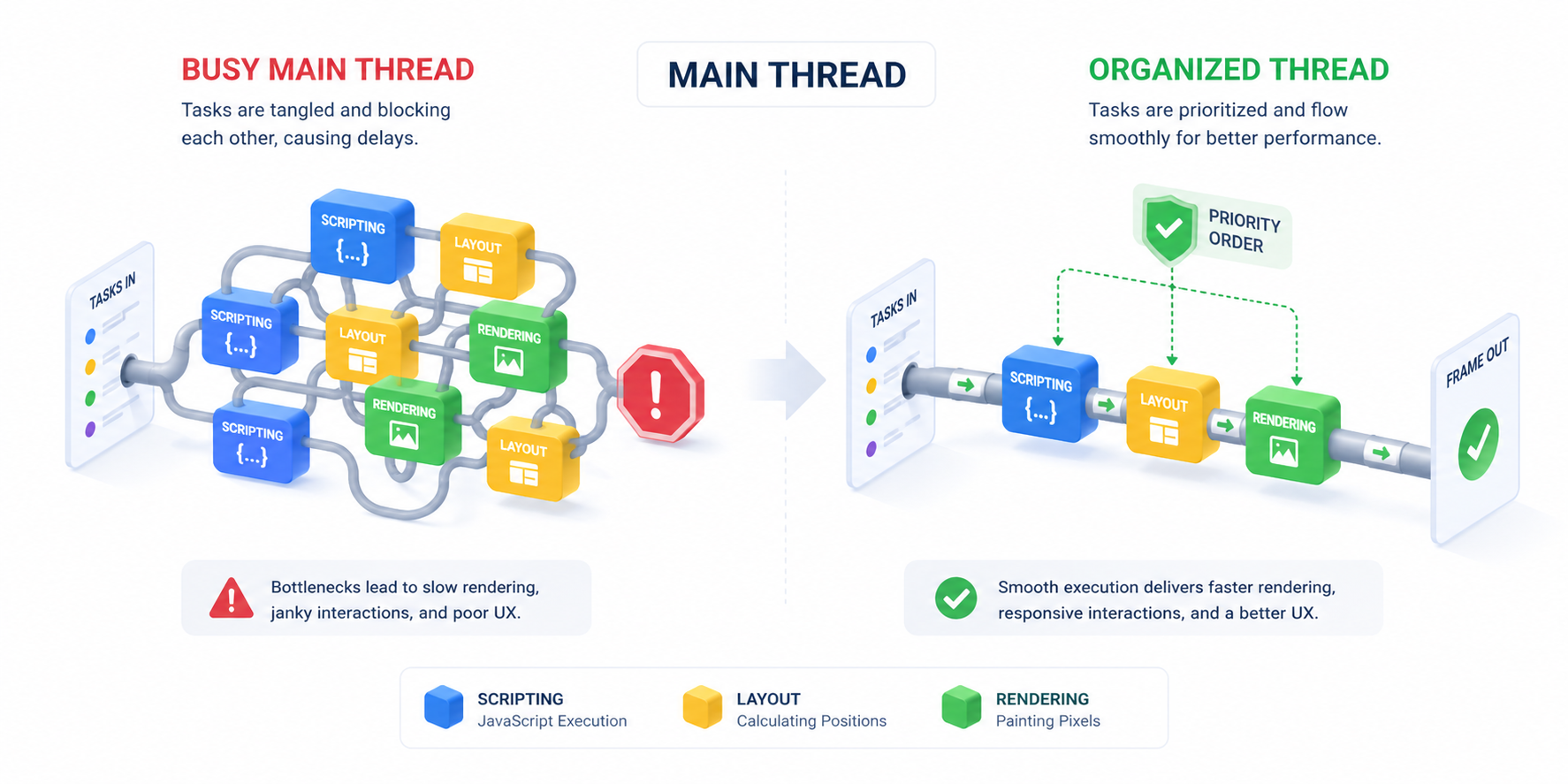
Minimize Main-Thread Work: Main-thread work is the time the browser spends running JavaScript and calculating styles and layout. Reduce it on WordPress by removing unused plugins and scripts, delaying and deferring JavaScript, trimming unused CSS, and avoiding bloated page builders — which improves Total Blocking Time and INP. Easy Optimizer bundles JS delay and unused-CSS removal into one free plugin.
“Minimize main-thread work” is one of the most misunderstood warnings in PageSpeed Insights. Most WordPress site owners see the red flag, panic, and start disabling random plugins. But once you understand what the main thread actually does, fixing it becomes systematic.
This guide breaks down what main-thread work is, why WordPress sites struggle with it, and the exact steps that reduce it on real production sites.
What Is the Main Thread?
The browser’s main thread is where almost all the work of rendering a webpage happens. JavaScript parsing, JavaScript execution, layout calculation, painting, garbage collection — all of it queues up on this single thread.
When the main thread is busy, two things happen:
- The page can’t render new content. That extends LCP.
- The browser can’t respond to user input. That tanks Interaction to Next Paint (INP) — the new Core Web Vitals metric that replaced FID in 2024.
PageSpeed Insights breaks main-thread work into categories:
- Script Evaluation — running JavaScript
- Style & Layout — calculating CSS rules and element positions
- Rendering — painting pixels to screen
- Parsing HTML & CSS — turning text into the DOM and CSSOM
- Garbage Collection — cleaning up memory
- Other — miscellaneous browser overhead
On a typical WordPress site, Script Evaluation dominates — usually 60–80% of total main-thread time. Reduce JS work, and almost everything else improves.
Why WordPress Sites Are Heavy
WordPress out of the box isn’t slow. The problem is what gets layered on top:
- jQuery still ships by default. ~80 KB minified, parses on every page.
- Theme bundles from page builders (Elementor, Divi, WPBakery) routinely ship 200–500 KB of JavaScript.
- Plugin scripts load on every page even when only needed on one.
- Third-party scripts — analytics, chat widgets, marketing pixels, A/B testing tools — pile up over time.
- Multiple animation libraries (GSAP, AOS, ScrollMagic, jQuery effects) loaded by different plugins.
I’ve audited WooCommerce sites running 4.5 MB of JavaScript on the homepage. That’s roughly 2–3 seconds of pure script evaluation on a mid-range phone. No optimization technique fixes that — you have to reduce the volume.
How to Identify Main-Thread Bottlenecks
PageSpeed Insights gives you the headline. For the diagnosis, use Chrome DevTools:
- Open DevTools → Performance tab
- Throttle to “Slow 4G” + “4× CPU slowdown” (simulates a real phone)
- Click record, reload the page, stop recording after the page settles
- Look at the “Main” track — long yellow bars are JavaScript work, purple is layout, green is paint
Click any long task. The bottom panel shows you the function call stack — usually pointing to a specific plugin or theme bundle.
That’s your target.
Fix 1: Defer All Non-Critical JavaScript
The fastest win. Adding defer to scripts means the browser:
- Downloads them in the background (parallel)
- Doesn’t execute them until the HTML is parsed
This frees up the main thread during initial render — the most critical window.
WordPress doesn’t defer scripts by default. You have to do it through code or a plugin.
add_filter( 'script_loader_tag', function( $tag, $handle ) {
    $skip = [ 'jquery-core' ]; // never defer these
    if ( in_array( $handle, $skip, true ) ) {
        return $tag;
    }
    return str_replace( ' src', ' defer src', $tag );
}, 10, 2 );
Easy Optimizer has a “Defer JavaScript” toggle with a built-in safe-list of WordPress core scripts that shouldn’t be deferred. One click, no code.
Fix 2: Delay JavaScript Until User Interaction
This is the technique with the biggest PageSpeed impact. Many scripts don’t need to run on page load at all — only when the user actually engages with the page.
Top candidates for delay on WordPress:
- Google Analytics, GTM
- Facebook Pixel, TikTok Pixel
- Hotjar, Microsoft Clarity, FullStory
- Tawk, Intercom, Crisp, Drift chat widgets
- YouTube/Vimeo embeds (use lite-youtube-embed instead)
- Comment system scripts (Disqus, Jetpack comments)
- Social share buttons
Delaying these typically removes 800–2000 ms of main-thread work from the initial page load. Easy Optimizer’s “Delay JavaScript” feature lets you delay scripts by URL keyword and trigger them on first user interaction (scroll, click, mousemove, keypress).
The user experience is identical. Real Lab and Field metrics improve dramatically.
Fix 3: Remove Unused JavaScript
PageSpeed Insights has a separate audit called “Reduce unused JavaScript.” It tells you exactly which files are loaded but never executed.
Common culprits on WordPress:
- Contact Form 7 loading on pages with no form
- WooCommerce loading on non-shop pages
- Page builder scripts loading sitewide
- Slider plugins loading on every page
- Multiple analytics tools doing the same job
Solutions:
- Audit and remove plugins you don’t need
- Conditionally dequeue scripts on pages where they’re not needed
- Use an asset manager like Asset CleanUp or Perfmatters to disable per URL
Manual conditional dequeue example:
add_action( 'wp_enqueue_scripts', function() {
    if ( ! is_page( 'contact' ) ) {
        wp_dequeue_script( 'contact-form-7' );
        wp_dequeue_style( 'contact-form-7' );
    }
}, 100 );
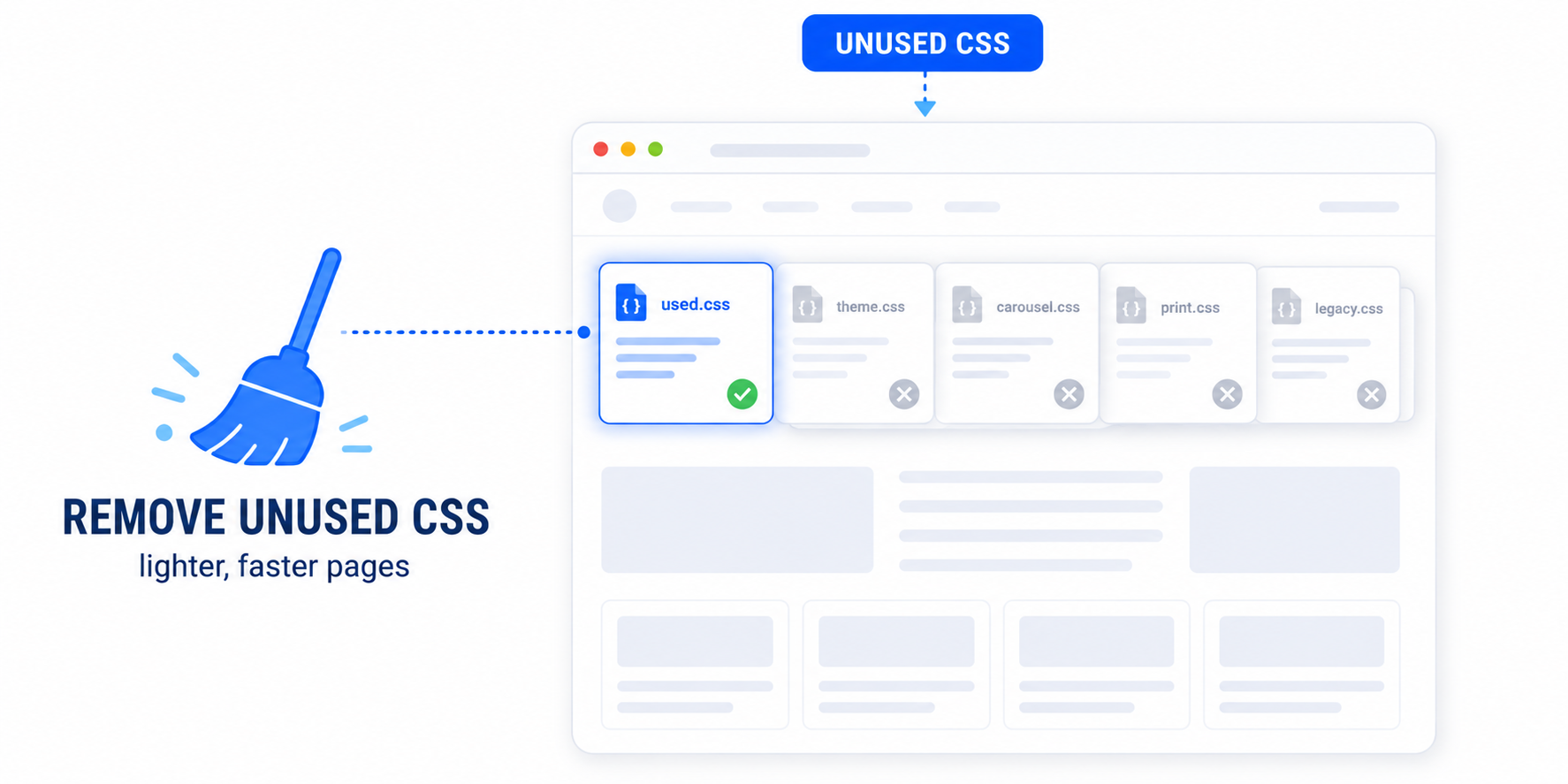
Fix 4: Remove Unused CSS
Wait — isn’t this about JavaScript? It is. But unused CSS still adds to main-thread work because:
- The browser parses it (parsing CSS time)
- It calculates styles for elements that don’t exist (style/layout time)
- It increases memory pressure (more garbage collection)
Most WordPress sites load 200–500 KB of CSS where 80–90% is unused on any given page.
Easy Optimizer’s Unused CSS feature scans each page, identifies the rules actually used, and serves only those. Three modes:
- Async — CSS is loaded but doesn’t block rendering
- Delayed — CSS only loads after user interaction
- Removed — most aggressive, leftover CSS is purged completely
This single setting often cuts main-thread work by 30–40%.
Fix 5: Replace Heavy Embeds With Lightweight Alternatives
YouTube embeds are notorious. A single embedded video adds 600 KB+ of JavaScript and 50–100 ms of main-thread work, even before the user clicks play.
Solutions:
- Use lite-youtube-embed — a 3 KB facade that loads the real player only on click
- Use a plugin that generates click-to-load embeds for YouTube/Vimeo
- For non-critical videos, use a static thumbnail with a play overlay that loads the iframe on click
The same applies to Google Maps, Twitter embeds, Instagram embeds, and TikTok embeds — all heavy. Use facades or load on click.
Fix 6: Audit and Reduce Plugins
Each active plugin contributes to main-thread work in three ways:
- PHP execution time on the server (TTFB)
- CSS/JS shipped to the browser (parse + execute)
- WordPress hooks fired on every page load
The goal isn’t “fewer plugins” for its own sake — it’s fewer plugins doing things you don’t need.
Audit checklist:
- Any plugin not used in the last 30 days → deactivate, test for 1 week, delete
- Plugins providing overlapping features → keep one
- Heavy plugins (Elementor Pro, Divi, WPBakery) used for one or two pages → consider replacing those pages with native blocks
Fix 7: Choose Faster Themes and Page Builders
This is the one nobody wants to hear. Some themes and page builders are fundamentally heavy.
- Elementor + Astra, with no optimization → ~120 main-thread ms
- Divi Builder → ~180 main-thread ms
- WPBakery → ~200 main-thread ms
- GeneratePress / Kadence + native blocks → ~30 main-thread ms
If you’re stuck below 50 PageSpeed and you’ve optimized everything else, the page builder may be the bottleneck. Migration is painful but sometimes the right call.
Quick Checklist
- Identify the heaviest scripts using DevTools Performance tab
- Defer all non-critical JavaScript
- Delay third-party scripts (analytics, chat, pixels) until interaction
- Remove unused JavaScript (per-page dequeue or asset manager)
- Remove unused CSS to reduce parse + layout time
- Replace YouTube/Vimeo embeds with click-to-load facades
- Audit and remove unused or duplicate plugins
- Re-test after each change in PageSpeed Insights
Wrapping Up
Main-thread work is mostly a volume problem on WordPress. You’re shipping too much JavaScript, too much CSS, and too many third-party scripts that fire on initial page load. Fix the volume, and TBT, INP, and LCP all improve together.
Easy Optimizer handles defer, delay, and unused CSS removal — the three biggest contributors — in a single free plugin. No upsells, no bloat.
If your main-thread issues come from a heavy theme or page builder you’re stuck with, our WordPress Speed Optimization service is built for exactly that scenario.
![Image Elements Do Not Have [alt] Attributes](https://cdn.fluxpress.io/fp5nquhs1rvv02/mHynEZiC/rs:fit:2560:0/plain/https://fluxpress.io/wp-content/uploads/2026/06/Image-Elements-Do-Not-Have-alt-Attributes.png)